GuidesPublished 7 min read
What Is 3D Product Animation? A Complete Guide for Brands
3D product animation is a video made from a digital 3D model of a product instead of a camera shoot. It lets brands show design, features and internal mechanisms with perfect lighting, impossible camera moves and no physical prototype.

Key takeaways
- 3D product animation turns a 3D model (often your existing CAD file) into a marketing or explainer video — no physical sample or film crew needed.
- The most common formats are product reveals, feature animations, exploded views, mechanism animations and short social-media cuts.
- Its biggest advantages are control and reuse: perfect materials and lighting every time, camera moves a real camera cannot make, and one model that can produce many videos and images.
- A typical 15–30 second animation takes about 1–3 weeks, moving through brief, concept, production, review and delivery.
- Cost depends mainly on the product's complexity, video length, number of shots, deliverable formats and deadline.
3D product animation is a video made from a digital 3D model of your product instead of a camera shoot. The product is modeled (usually from its CAD file), given realistic materials and lighting, and then animated with virtual cameras. Because nothing is physically filmed, the camera can move anywhere: around the product, inside it, or through an exploded view of every component.
This guide explains what 3D product animation is, the main types, how a project works from CAD file to final video, what affects cost and timing, and how to decide whether it is right for your product.
What is 3D product animation?
A 3D product animation is a short film, typically 10 seconds to 2 minutes long, that presents a physical product using computer-generated imagery (CGI). It is used for product launches, websites, e-commerce pages, trade shows, crowdfunding campaigns, sales presentations and social media.
Every animation is built in the same basic way:
- A 3D model of the product is created or prepared from engineering data.
- Materials — plastics, metals, glass, fabric, screens and light strips — are matched to the real product.
- Lighting and environment are designed to suit the brand: a dark studio, a bright e-commerce backdrop, or a lifestyle scene.
- Cameras and motion are animated: the product rotates, opens, assembles, lights up or demonstrates a function.
- Rendering and compositing turn the scene into final video files, often with text, graphics and sound.
The result looks like premium product filming, but with complete control over every frame.
The main types of 3D product animation
Different goals need different kinds of animation. These are the formats brands use most.
Product reveal
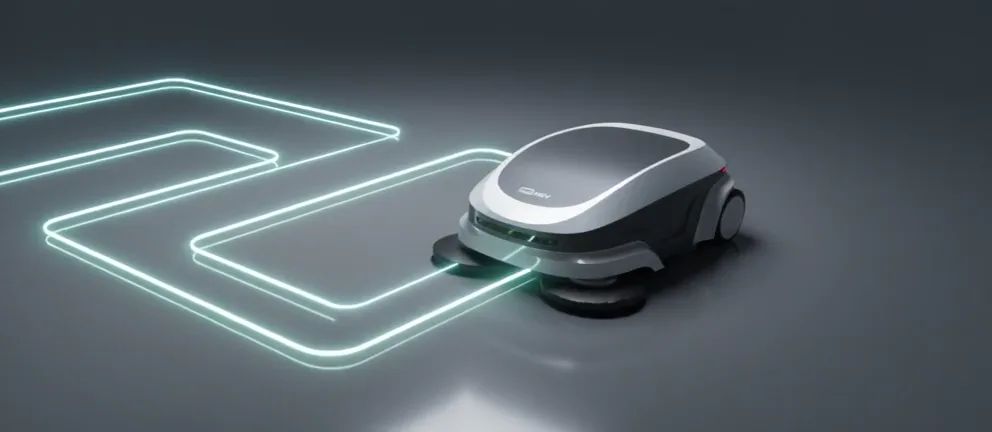
A cinematic first look that builds anticipation: dramatic light, slow camera moves and close-ups of signature details. Reveals are ideal for launch announcements and homepage hero videos. The autonomous cleaning robot film opens with exactly this kind of spotlight reveal.
Feature animation
Short clips that explain one feature at a time — a touchscreen interface, a charging system, a sensor, a hidden compartment. Feature animations work well on product pages, where each clip sits next to the feature it explains.
Exploded view animation
The product separates into its components in a clean, controlled sequence, then reassembles. Exploded views are the best way to show build quality and engineering that is normally hidden inside a shell. See the smart sensor exploded view for an example that opens a compact device layer by layer: housing, flexible circuit, PCB and display.
Mechanism animation
Technical products often have movements, positions and accessories that are hard to explain with photos. A mechanism animation shows each movement from the angle that explains it best. This is common for medical devices, machinery and furniture with moving parts — like the surgical operating table animation that walks through every tilt, section and accessory.
Social-media cuts
Vertical 9:16 and square 1:1 or 4:5 versions designed for Instagram Reels, TikTok, YouTube Shorts and LinkedIn. Because the 3D scene already exists, re-framing a master film for social channels is far faster than reshooting.
Product launch package
A complete set: a master film for the website and events, short cut-downs for ads and social media, and still renders for e-commerce and press — all from the same 3D model.
Why brands choose 3D animation instead of filming
Live filming is still the right choice for lifestyle storytelling and real people. But 3D product animation has advantages that filming cannot match.
- No physical sample needed. You can market a product before mass production, or before a prototype even exists.
- Show what cameras can’t. Fly through the product, see inside it with an X-ray pass, or explode it into parts.
- Perfect, consistent quality. No dust, fingerprints, reflections of the crew or imperfect prototypes. Materials and colours match your specification.
- Easy to update and reuse. A colour change, a new version or a new feature is an edit to the existing scene, not a new shoot. The same model also produces still images, 360° views and social content.
- Explains technology clearly. For technical and B2B products, showing how it works is often more persuasive than showing how it looks.
How a 3D product animation project works
Most professional projects follow five steps. This is the process used for every project on this site.
1. Brief
You share the product (CAD files, photos or references), the goal of the video, the audience, where it will be used and the deadline. A clear brief is the single biggest factor in a smooth project.
2. Concept
The visual direction is defined: mood, lighting, environment, camera movement and the story — which features appear in which order. This is usually agreed through a short storyboard or a few style frames before animation starts.
3. Production
The model is prepared, materials and lighting are built, and the animation is produced and rendered. Modern workflows also use AI-assisted tools to speed up parts of animation and compositing, while the product itself stays true to the 3D model.
4. Review
You receive a preview and give feedback. Revision rounds are planned into the schedule, so changes to timing, camera or text are expected rather than a problem.
5. Delivery
Final videos are exported in every format you need — for example 16:9 for the website and YouTube, 9:16 for Reels and TikTok, and 1:1 or 4:5 for feeds — optimized for quality and fast loading.
What you need to provide
The more accurate the input, the more accurate the animation.
- 3D/CAD files — STEP, IGES, SolidWorks, Rhino, FBX or OBJ are all common. Engineering files sometimes need cleanup for visualization, which is a normal part of the job.
- If there is no CAD: clear photos from several angles, dimensions, sketches or technical drawings.
- Material and colour references: Pantone, RAL or HEX codes, finish samples or photos of the real product.
- Brand guidelines: logo, fonts, colours and tone of voice.
- Key messages: the three to five features that matter most to your customers.
How long does 3D product animation take?
A typical 15–30 second product animation takes around 1–3 weeks from brief to delivery. Timing depends on:
- whether a usable 3D model already exists,
- the complexity of the product and its materials,
- the number of shots, scenes and special effects,
- the number of review rounds and output formats.
Longer films, detailed mechanism animations or full launch packages take longer. If you have a fixed launch date, share it in the brief so the schedule can be planned backwards from it.
What affects the cost of 3D product animation?
There is no standard price list, because two products of the same length can need very different amounts of work. These are the main cost drivers:
| Factor | Why it matters |
|---|---|
| Product complexity | More parts, moving mechanisms and detailed materials take longer to prepare and animate. |
| 3D model availability | A clean CAD file saves modeling time; modeling from photos adds work. |
| Video length and number of shots | Each shot needs its own camera, lighting and render time. |
| Effects | Exploded views, X-ray passes, screen/UI animation and graphics add production time. |
| Deliverables | Extra aspect ratios, cut-downs and still images increase output work. |
| Deadline | Rush schedules may require more production resources. |
The best way to get an accurate number is a short brief with your product, the goal and the deadline — you can send one here.
When is 3D product animation the right choice?
3D product animation is especially effective when:
- you are launching a product and need visuals before manufacturing,
- the product has hidden technology or internal components worth showing,
- you sell technical or B2B products that need explaining (robotics, medical devices, industrial equipment, electronics),
- you need many consistent assets — colours, variants, formats — from one source,
- you are running crowdfunding, trade-show or paid social campaigns where attention is won in the first seconds.
If your story is mainly about people, places and emotion, live-action filming — or a mix of filming and 3D — may be the better fit.
How to brief a 3D product animation (checklist)
Use this checklist before contacting an animator:
- What is the goal: launch, explainer, sales tool, social ads?
- Who is the audience, and where will the video be shown?
- Which three to five features must be shown?
- Do you have CAD files? In which format?
- Material, colour and brand references
- Desired length and formats (16:9, 9:16, 1:1)
- Deadline and any fixed launch dates
- Examples of animations you like
Conclusion
3D product animation gives brands a way to show a product exactly as it was designed — including the parts customers never normally see. Built once from an accurate 3D model, it can power a launch film, product-page clips, social media content and still images for years.
If you have a product you want to bring to life, explore the 3D product animation service or start a project with a short brief.