GuidesPublished 6 min read
3D Animation vs Live Action Product Video: Which Should You Choose?
For most product marketing, 3D animation offers greater control and reuse, while live-action excels at human storytelling and real‑world context. This article compares the two formats across goal, product type, timeline, flexibility and reuse, and shows when mixing them makes sense.

Key takeaways
- 3D animation gives full control over lighting, camera moves and internal views without needing a physical prototype.
- Live‑action video works best when the story relies on real people, environments or emotional context.
- Timeline for 3D animation depends on model availability and shot complexity, while live‑action adds location scouting, crew and shoot days.
- Reusing a 3D model for colour variants, social cuts and still images is far faster than reshooting live footage.
- Combining both formats lets you show real‑world usage with detailed product interiors or exploded views.
For most product marketing, 3D animation offers greater control and reuse, while live-action excels at human storytelling and real‑world context.
This article compares the two formats across goal, product type, timeline, flexibility and reuse, and shows when mixing them makes sense.
What is 3D product animation and live-action product video?
3D product animation builds a video from a digital model of the product. The model is usually created from CAD files, given realistic materials and lighting, and then animated with virtual cameras. Because nothing is physically filmed, the camera can move anywhere: around the product, inside it, or through an exploded view of every component.
Live-action product video records the real product with a camera crew, lights and often talent or real‑world settings. It captures genuine textures, reflections and the way light interacts with the actual object. The result feels authentic and can convey emotion through human performance or environment.
Both formats can deliver the same aspect ratios (16:9, 9:16, 1:1, 4:5) and can be combined with graphics, text and sound in post‑production.
How do goals shape the choice?
Start by defining what you want the video to achieve.
- Launch or teaser: If the goal is to build anticipation before manufacturing, 3D animation lets you show the product as it will look, even if no physical sample exists. Live‑action would require a prototype or a mock‑up, which may not be available.
- Explaining function: For technical or B2B products where the value lies in how a mechanism works, 3D animation can cut away housing, show fluid flow or animate internal gears. Live‑action struggles to reveal what is hidden inside a shell.
- Lifestyle storytelling: When the message depends on showing the product used by real people in a relatable context—such as a fitness tracker on a runner or a coffee maker in a kitchen—live‑action captures genuine interaction and emotion.
- Social‑media cuts: Both formats can be re‑framed for vertical or square ratios, but 3D animation offers faster turnaround because the master scene already exists; live‑action would need new shoots or costly reframing.
- Brand films with emotion: If the video aims to evoke a feeling through music, scenery and human performance, live‑action is often the stronger choice.
Matching the goal to the strengths of each format narrows the decision early.
Which product types suit each approach?
Consider the nature of the product and what aspects you need to highlight.
Products that favour 3D animation:
- Items with complex internal mechanisms (robotics, medical devices, industrial gear).
- Electronics with hidden PCB, sensors or flexible circuits.
- Modular systems where showing assembly or disassembly adds value.
- Products still in development, where visuals are needed before tooling.
- Colour or material variants that must be shown accurately without repainting prototypes.
Products that favour live‑action video:
- Consumer goods where texture, finish and real‑world use matter (apparel, footwear, home textiles).
- Goods that benefit from demonstration by a person (kitchen appliances, power tools, sports equipment).
- Items whose appeal is tied to a specific setting (outdoor gear shown on a trail, luxury watches in a boutique).
- Campaigns that rely on authentic human reactions or unscripted moments.
If your product has both strong technical details and a lifestyle angle, a hybrid approach may be ideal.
Timeline and production considerations
3D animation timeline The process follows brief, concept, production, review and delivery. Key factors that affect length:
- Availability of a clean 3D model: CAD files reduce modeling time; modeling from photos adds work.
- Number of shots and camera moves: each shot needs its own lighting and render setup.
- Complexity of materials: detailed finishes, transparencies or subsurface scattering increase render time.
- Special effects: exploded views, X-ray passes, screen/UI animation or fluid simulations.
- Number of review rounds and output formats: more aspect ratios or cut‑downs increase compositing work.
A typical 15‑30 second animation takes about one to three weeks from brief to delivery. Longer mechanism animations or full launch packages take longer, but the schedule is predictable because work stays in the digital domain.
Live‑action timeline Live‑action adds several steps before filming:
- Location scouting and securing permits.
- Casting talent or arranging product handlers.
- Building or dressing sets, arranging lighting and rigging.
- Shoot days: depending on shots, this can range from half a day to several days.
- Post‑production: editing, colour grading, visual effects (if any), sound mix and mastering.
Because of these variables, live‑action projects often run from three to six weeks for a short product video, and longer if multiple locations or extensive talent are involved. Weather, equipment availability and talent schedules can introduce uncertainty.
Both formats include review rounds, but revising a 3D scene usually means adjusting the digital timeline or re‑rendering a shot, which is faster than reshooting live footage.
Flexibility, updates and reuse
One of the biggest practical differences lies in how easily you can change or reuse the content.
3D animation flexibility:
- Colour or material changes are made by editing the shader; the same model renders instantly.
- Adding a new feature or adjusting timing involves moving keyframes in the existing scene.
- Generating social‑media cuts, still renders or 360° views requires only re‑framing or re‑rendering from the master file—no new shoot.
- Creating variant videos for different markets (e.g., language‑specific text overlays) is a simple compositing task.
Live‑action flexibility:
- Changing a colour or finish usually means repainting or re‑coating a physical prototype and reshooting.
- Adding a new feature may require building a new prototype or modifying the existing one on set.
- Producing alternative aspect ratios often means reframing the original footage, which can lose resolution or require reshooting key moments.
- Still images for e‑commerce need a separate photoshoot unless you grab frames from the video, which may not meet quality standards.
If you anticipate needing multiple versions, colour studies or frequent updates, 3D animation typically saves time and cost over the long term.
When to combine 3D and live-action
A hybrid approach leverages the realism of live footage with the explanatory power of 3D. Common patterns:
- Opening lifestyle shot: Live‑action shows the product in use (a robot delivering room service in a hotel hallway).
- Insert 3D detail: A cutaway reveals the internal navigation system, sensor array or battery pack that cannot be seen in the live shot.
- Exploded view overlay: After a live demonstration of the product assembling, an animated exploded view shows each component and how they fit together.
- Screen or UI animation: Live footage of a person touching a display is enhanced with animated UI elements that show what the user sees.
To make a hybrid work, brief both teams early. The live‑action shoot should capture clean plates with consistent lighting and tracking markers if needed, while the 3D team builds matching virtual cameras and lighting so the composites feel seamless. Planning the split in the concept stage avoids costly reshoots later.
Conclusion
Choosing between 3D animation and live‑action product video depends on what you want to show, who you are speaking to and how you plan to use the final piece. 3D animation gives unmatched control over camera moves, internal views and reuse, making it ideal for technical explanations, pre‑launch visuals and multi‑format campaigns. Live‑action captures authentic human interaction, real‑world texture and emotional context, which works best for lifestyle storytelling and product‑in‑use demonstrations.
If your product has both a strong technical story and a lifestyle angle, consider combining the two: let live footage set the scene and use 3D inserts to reveal what the eye cannot see.
To start a project, share your brief, CAD files or reference material and your goals. You can start a project with a short description, or learn more about the 3D product animation service.
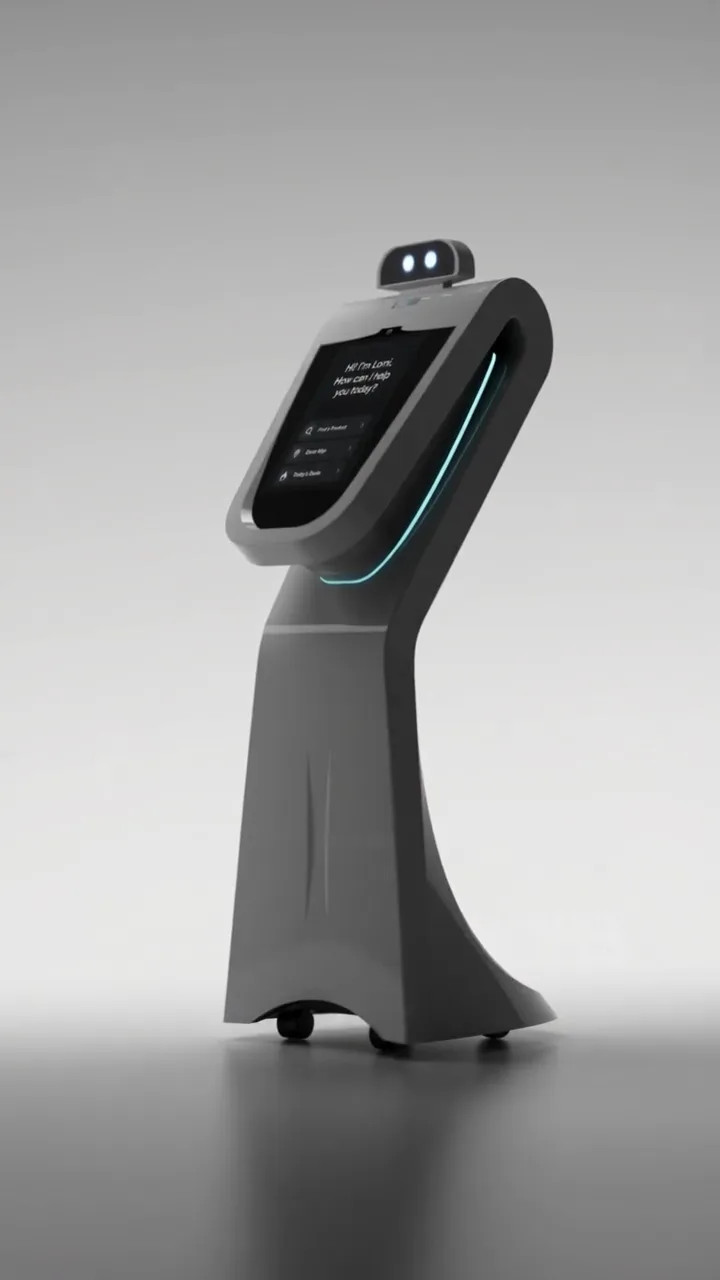
Retail Assistant Robot — Product Commercial shows how a 3D reveal can highlight a kiosk’s interface and movement in a bright studio setting.
Autonomous Cleaning Robot — Product Commercial uses a combination of slow product moves and close‑ups to convey reliability before a physical prototype existed.
Electric Water Heater — Product Visualization demonstrates how still renders and short animations from the same model support both e‑commerce pages and launch social cuts.
Explore the relevant service page or get in touch to discuss which format—or mix of both—fits your next product video.